

Currently Empty: $0.00
Why a Beautiful Christmas Card Template Matters for Your Holiday Season?
The Importance of Sending Christmas Cards
Christmas cards are more than a seasonal custom — they are a thoughtful expression of love, care, and appreciation. In an increasingly digital world, receiving a physical holiday card brings a sense of nostalgia and warmth that digital messages simply cannot replicate. Each card you send becomes a tangible reminder that someone is thinking of you during the festive season.
Christmas cards also help reconnect families and friends across distances. A handwritten message, a cherished photo, or a meaningful quote turns a simple card into a keepsake that recipients treasure for years. Whether you’re expressing joy, gratitude, or holiday cheer, using the right Christmas card template helps ensure your message feels heartfelt and memorable.
Creative Ideas for Your Christmas Cards
A personalized or creative approach can transform your holiday greetings into unforgettable keepsakes. Whether you’re using a digital Christmas card template or designing a handmade card, here are unique ideas to elevate your holiday messages.
1. Create a Photo Collage That Highlights Your Year
Photo collages are one of the most treasured Christmas card ideas.
A collage allows you to:
- Share favorite family moments
- Highlight major milestones
- Showcase how kids or pets have grown
- Give loved ones a peek into your life
A photo Christmas card template gives your card warmth, personality, and emotional impact.
2. Write a Unique or Heartfelt Message
Words bring emotion to your Christmas card. Adding a personal message turns an ordinary card into something meaningful.
Ideas include:
- A short custom poem
- A favorite holiday quote
- A reflection on your year
- A gratitude note
- A Christmas blessing
Personalized messages make your holiday card feel intimate and special.
3. Add Crafty, Handmade Elements
If you enjoy DIY projects, enhancing your card with handmade elements adds charm and personality.
Try adding:
- Glitter or metallic accents
- Stamps or stickers
- Ribbons, twine, or fabric
- Washi tape
- Hand-drawn illustrations
Even if you start with a digital Christmas card template, small handmade touches can create a beautifully unique look.
4. Include a Friendly Call to Action
A Christmas card is also a way to strengthen relationships.
Consider writing a simple call to action such as:
- “Let’s catch up soon!”
- “We’d love to hear your holiday updates.”
- “Join us for our Christmas gathering!”
These small lines encourage connection and deepen engagement during the festive season.
5. Reflect Your Family’s Personality
Your Christmas card should represent you.
Personal touches to consider:
- Choose colors that match your home decor
- Pick playful layouts if you have children
- Add elements that reflect your hobbies (pets, travel, sports, etc.)
- Keep it minimalistic if you prefer a clean, modern style
A customized Christmas card template allows you to tailor every detail to match your family’s personality.
Why Choose Canva for Your Christmas Card Design?
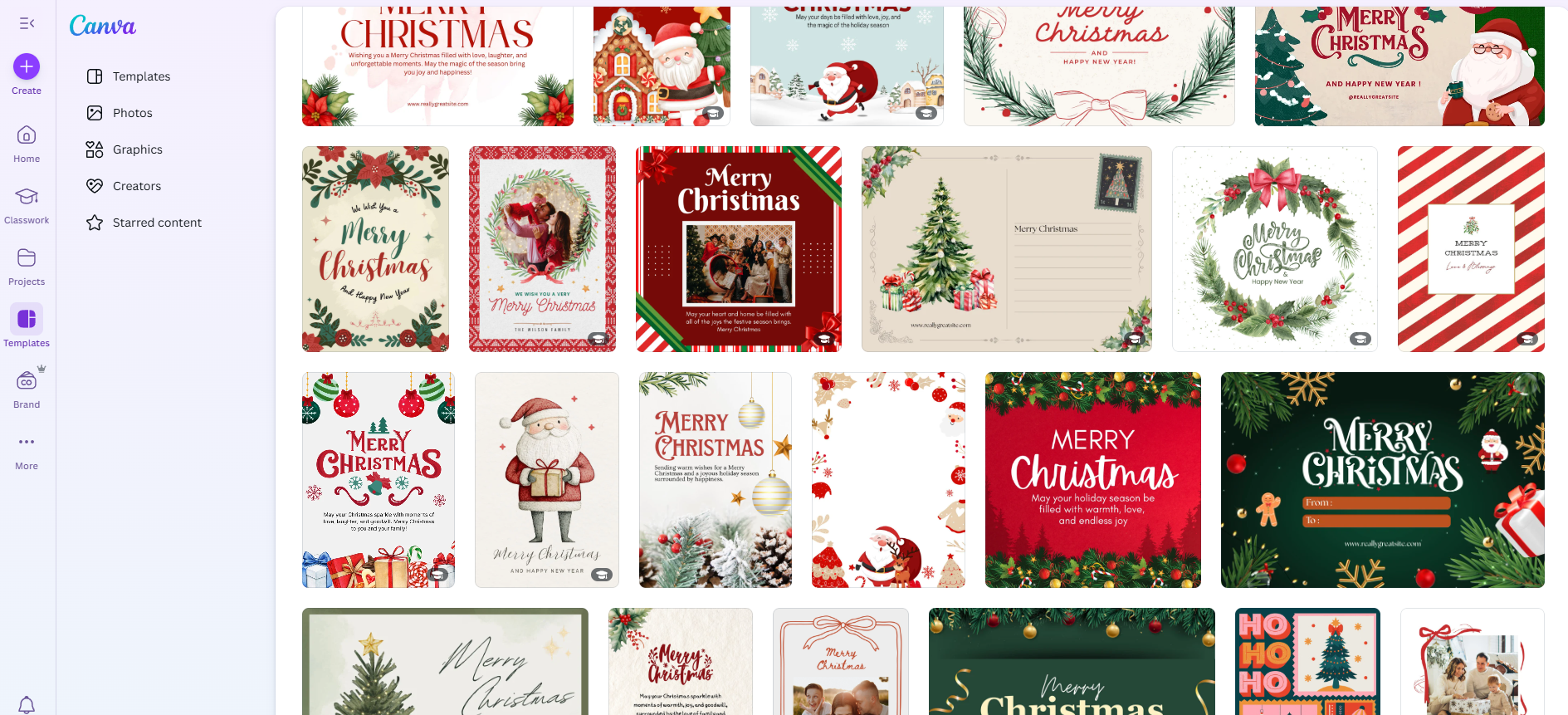
Before selecting a Christmas card template, the platform you use to design your card matters. Canva is one of the most user-friendly and flexible tools for creating beautiful holiday cards — even if you’re not a designer.
1. Beginner-Friendly & Easy to Use
Canva removes all the complexity of design software. No layers, no complicated tools — just simple drag-and-drop editing. Even complete beginners can create professional cards in minutes.
2. No Software Needed
No downloads or installations. Canva works directly in your browser or mobile app, making it accessible anytime, anywhere.
3. Works on All Devices
Whether you’re on a laptop, tablet, or phone, Canva keeps your projects synced and accessible anywhere.
4. Free to Use
Most features, fonts, elements, and holiday graphics are available for free. You don’t need Canva Pro to use your template.
5. Perfect for Print & Digital Sharing
Canva allows you to download your card in:
- High-quality JPG/PNG
- Print-ready PDF
- Optimized digital formats for WhatsApp, email, or social media
Whether you’re mailing cards physically or sending holiday greetings digitally, Canva makes both effortless.
6. Fast Customization
Change photos, colors, fonts, and layouts in seconds. Add your family name, year, or special message with total flexibility.
This is exactly why Canva is the ideal platform for festive designs — beautiful results, zero stress.
Introducing the Beautiful Christmas Card Template for Joyful Holiday Greetings
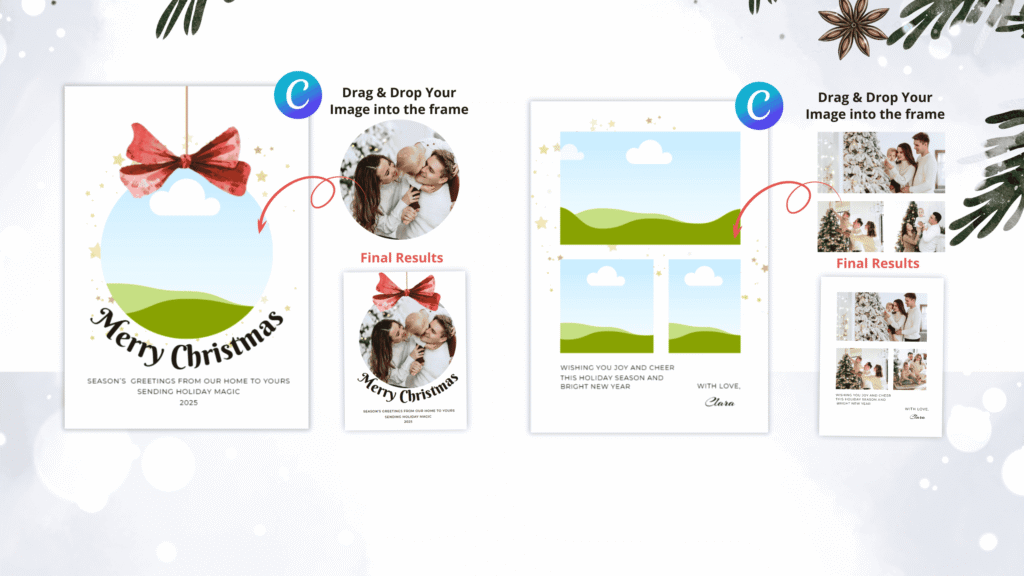
To make your holiday design process easier, we created a premium Christmas card template that works seamlessly in Canva. It’s perfect for families, small businesses, creators, and online sellers who want a polished, festive card without hiring a designer.
This template helps you personalize your greeting within minutes — with professional, high-quality aesthetics.
What Makes This Christmas Card Template Special?

1. Fully Editable in Canva (No Experience Needed)
This template is designed for everyone. You don’t need graphic design skills or expensive software. Simply open the template in Canva, personalize your message, add your photo, and download
2. Modern, Festive & Family-Friendly Design
The layout features warm holiday aesthetics—perfect for family photos, holiday portraits, or even business greetings.
3. High-Quality for Print & Digital Use
Use it for:
- Printable holiday cards
- WhatsApp greetings
- Email newsletters
- Social media posts
4. Fully Personalized Holiday Cards
Add your family name, message, year, or adjust the color palette to match your festive theme.
Who Is This Christmas Card Template Perfect For?
This professionally designed Canva template is created to serve a wide range of users — from families to business owners. Whether you’re sending personal greetings or designing cards to sell, this template gives you the perfect starting point.
Here’s a detailed look at who can benefit the most.Here’s who benefits the most:
1. Families Sending Holiday Photo Cards
If you love sharing your favorite memories from the year, this template is ideal for creating personalized family Christmas photo cards.
Perfect for:
- Parents wanting to showcase their children
- Couples sharing milestone moments
- Families sending warm holiday greetings to relatives and friends
With easy photo placeholders and a festive layout, your card will look polished and heartfelt — without hours of editing.
2. Etsy Sellers & Print-on-Demand Creators
Digital product sellers will love how customizable and market-ready this template is.
Great for:
- Etsy shop owners selling printable holiday cards
- Print-on-demand designers creating card variations
- Digital creators offering personalized Christmas greetings
The modern, clean design helps your listings stand out, improves product quality, and makes fulfillment faster and easier.
3. Small Businesses Sending Client Greetings
If you’re a business owner wanting to show appreciation during the holidays, this template helps you create professional Christmas cards for clients with ease.
Use it for:
- Thanking loyal customers
- Sending corporate holiday greetings
- Adding branding, logos, and business messages
Your card will look polished, trustworthy, and aligned with your brand identity.
4. Content Creators, Coaches & Online Personal Brands
Creators often rely on consistent visual style — and this template helps you maintain a professional look across platforms.
Ideal for:
- Influencers sending digital holiday greetings
- Coaches thanking clients or students
- Online educators reconnecting with their audience
Editable text, colors, and photos help you match your brand aesthetic perfectly.
5. Anyone Wanting a Beautiful, Easy-to-Create Card
Not a designer? No problem.
This template is perfect for:
- Individuals who want a gorgeous holiday card without complex software
- People with limited time
- Beginners using Canva for the first time
- Anyone wanting a fast, stress-free design process
With drag-and-drop editing, you can create a beautiful, professional-quality Christmas card in minutes — no experience needed.
How to Use This Christmas Card Template (Simple 3-Step Process)
Step 1: Open the Template in Canva
No Canva Pro required — works with the free version.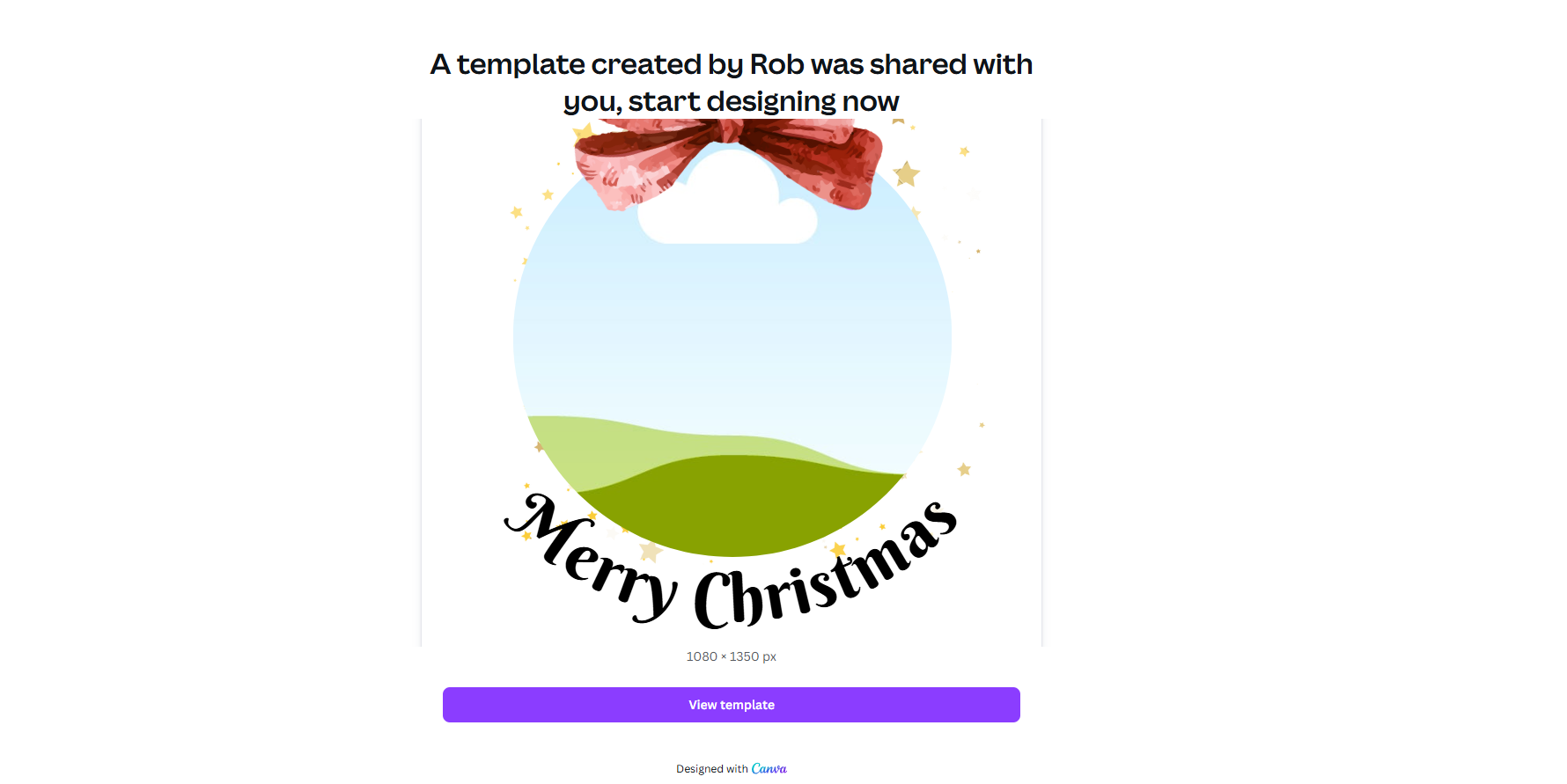
Step 2: Customize Your Design
Add your photo, edit text, change colors, or rearrange elements.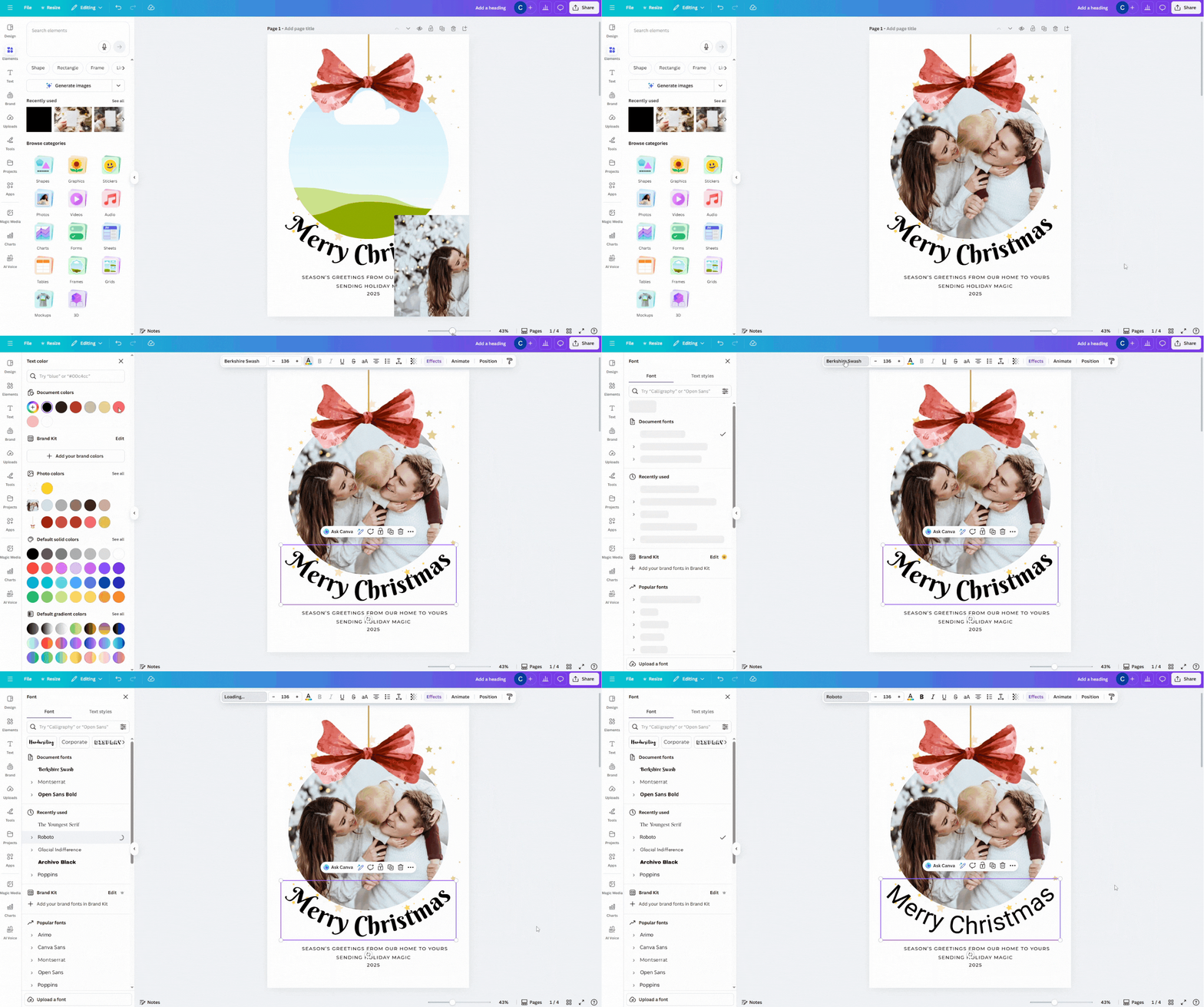
Step 3: Download & Share
Print your card or send it digitally to loved ones and clients.
Sending Your Christmas Cards: How to Prepare, Mail & Deliver Them on Time
Once your Christmas card design is complete, the final step is making sure your holiday greetings reach family, friends, customers, or clients on time. Sending Christmas cards may seem simple, but following a few thoughtful steps can help ensure your cards are delivered smoothly and leave a lasting impression.
1. Create a Complete Recipient List
Before mailing your cards, start by building a Christmas card recipient list. This helps you stay organized and ensures no one gets left out.
Tips for building your list:
- Include family, friends, co-workers, clients, and business partners.
- Double-check addresses to avoid returned mail.
- Keep a digital list so it’s easy to update each year.
Having a clear, organized mailing list reduces stress and makes sending holiday cards faster and more efficient.2. Check Postage & Send Early
One of the most common mistakes people make is sending their cards too late. Postal services become extremely busy during December, so it’s best to mail Christmas cards early.
Here’s what to keep in mind:
- Verify postage rates, especially for oversized or international cards.
- If sending cards abroad, mail them even earlier (2–3 weeks ahead).
- Consider using priority shipping if you’re running behind schedule.
Sending your cards early ensures they arrive before Christmas and increases the likelihood that your recipients can display and enjoy them throughout the holiday season.
3. Add a Handwritten Message
While printed cards are beautiful, a simple handwritten note can elevate your greeting and make it feel more meaningful.
Examples of handwritten additions:
- A short personal message
- A festive quote or blessing
- Your signature with the date
- A small note referencing shared memories
These small gestures make your holiday card feel personal, heartfelt, and truly special.
4. Package Your Cards Neatly
Presentation affects how your card is received, both emotionally and visually.
Best practices:
- Use quality envelopes that match your card design.
- Seal envelopes securely.
- Use decorative stickers, wax seals, or custom labels for added charm.
- Write names clearly to avoid delivery issues.
Small details create a polished, professional look — especially if you’re sending business Christmas cards.
5. Celebrate the Joy You’re Sharing
AOnce your cards are mailed, you can relax knowing you’re spreading holiday cheer. A beautifully designed Christmas card — especially one created with a personalized Canva template — brings joy, warmth, and connection to everyone who receives it.
Whether it’s family celebrating your milestones, friends appreciating your thoughtfulness, or clients feeling valued, your Christmas card becomes a meaningful reminder of the relationships you cherish.
Why Choose Our Christmas Card Template? (Top Benefits)
Affordable – Premium Quality Without the Cost
Holiday printing and design costs add up quickly. Our template gives you professional-level design for only a fraction of the price of hiring a graphic designer.
You get:
- A polished, modern layout
- High-resolution file quality
- Unlimited re-use
- Lifetime access
It’s the perfect budget-friendly solution for families, small businesses, creators, and digital sellers looking for stunning results without overspending.
Time-Saving – Create a Card in Minutes
No more spending hours searching for layouts or adjusting complicated tools. This template is designed for speed and simplicity, allowing you to complete your Christmas card in just a few minutes.
With ready-made placeholders and pre-designed text layouts, all you need to do is:
- Insert your photo
- Edit your message
- Download your finished card
It’s the fastest way to create beautiful holiday greetings — especially during the busy festive season.
Fully Customizable
Every element in this Canva template is editable, giving you complete creative freedom. Customize your card to match your personality, brand, or family style.
You can easily change:
- Colors
- Fonts
- Photos
- Backgrounds
- Message wording
- Decorative elements
Whether you prefer modern, traditional, minimalist, or bold designs, you can transform the card to suit your vision perfectly.
Works on Free Canva
You don’t need Canva Pro or any paid software to use this template. Everything is compatible with Canva’s free version, making it accessible for everyone.
Just open the link → customize → download.
This makes it ideal for:
- First-time Canva users
- Families who want a fun DIY project
- Sellers and creators scaling their digital shop
- Businesses looking for economical design solutions
No subscriptions. No hidden costs. Just easy editing.
Ideal for Personal & Business Use
This template is versatile enough to serve a wide range of users.
Perfect for:
- Families sending holiday photo cards
- Small businesses sending corporate greetings
- Etsy and POD creators selling printable cards
- Coaches and influencers thanking their audience
- Anyone who wants high-quality design with minimal effort
You can adapt the messaging, add branding, swap photos, or create multiple versions for different audiences. Its professional layout ensures your card looks polished — whether you’re sending it to friends or clients.
Spread the Magic of Christmas — Get Your Christmas Card Template Today!
If you want a warm, professional, and beautifully designed card this holiday season, this Christmas card template is made just for you.
👉 Get the Beautiful Christmas Card Template for Only $2.00!
Create something unforgettable — one gorgeous holiday card at a time. 🎄✨